Tuesday, September 30, 2014

Tuesday Trivia: What's in a name?


From today we can register .nz domains! This means we no longer need to include the "co" and "org" when we choose a domain name for our websites. We can also choose to be plain old .nz, for example spiral.nz, trademe.nz or stuff.nz

$35 million for a domain name! Domain names have come a long ways since their beginnings in 1985. It's hard to believe that one would be worth US$35 million though!

Never forget a name again. Dale Carnegie's trick for remembering names. More useful for people's names I imagine as we have Google to help us with domain names.

"Hello, my name is Inigo Montoya..." - Inigo Montoya

Tuesday, September 23, 2014

Tuesday Trivia: Swans and Black Swans

Image: Marek Szczepanek

Crown Lynn Swan Vases on TradeMe. That iconic piece of Kiwiana.

Swans inspired a whole theory of sudden surprises based on swans (well, sort of). Thought up after Black Swans were found in the southern hemisphere after Europeans assumed for thousands of years that all swans were white.

How dangerous are swans? When swans attack it pays to be careful.

"rara avis in terris nigroque simillima cygno" - Juvenal
("a rare bird, very like a black swan" i.e. extraordinarily unusual)

Tuesday, September 16, 2014

Tuesday Trivia: Weird art and other such creations

The Twitter logo. Just a bunch of circles really.


19 of the 100 diagrams that changed the world. Or had some major effect at least.

Unusual business cards. I think the lego one is my favourite.

Kaiju and other assorted beasts put into classical landscapes.

"How bizarre" - OMC

Tuesday, September 09, 2014

Tuesday Trivia: Technology Marching Ever Onwards

Image: http://www.nieuweheren.com/products/beauty-and-the-geek/

Just a few examples of the truly great heights technology is reaching these days...

Ever feel the need to be handling your phone even when you don't have it with you?

Get woken up by complete strangers from across the globe. A great improvement on the alarm clock.

A wireless mouse and keyboard integrated into a pair of jeans. For those times when having a keyboard printed across the front of your jeans is easier than using your laptop.

And there is so much more out there...

"Technology is nothing. What's important is that you have faith in people, that they're basically good and smart, and if you give them tools, they'll do wonderful things with them." - Steve Jobs

Tuesday, September 02, 2014

Tuesday Trivia: Tools to change the way we see the world

By Tom Burke from Morgan Hill, CA, USA (Flickr) [CC-BY-2.0 (http://creativecommons.org/licenses/by/2.0)], via Wikimedia Commons

In a world of increasingly large numbers it can be hard at times to gain a sense of perspective. Thankfully the Web is full of tools that can help. Here are just a few examples that:

What's happening in one second on the Internet? A great list of what happens in one second online. Make sure you scroll to the bottom to see how the number of emails sent compares with the other stats.

How much money are the big Internet companies making right now? I was a little surprised at some of these, particularly Amazon's profit.

Watch the Earth breathe. See the world showing births, deaths and carbon dioxide production in real time country by country.

"Don't believe anything you read on the net. Except this. Well, including this, I suppose." - Douglas Adams

Tuesday, August 26, 2014

Tuesday Trivia: A touch of silliness

"Mandarin.duck.arp". Licensed under Public domain via Wikimedia Commons

What silly people taking photos at times like these.

Silly bears acting like people.

A few photos of people struggling with in rather silly ways.


Ok we'll stop.

Tuesday, August 19, 2014

Tuesday Trivia

Image: Alan Watson - Alan's bunk last Saturday night. The Spiral team can get intrepid occasionally

Does a mosquito repelling wristband sound handy to you?

Turn your iPad into a typewriter with help from Tom Hanks.

Anyone else want to stay in this jungle gym house? Looks like such a fun place, just don't drop anything small when you're on the top level.

Tuesday, August 12, 2014

What's out there spiralling through our solar system?

Image: ESA/Rosetta/MPS for OSIRIS Team MPS/UPD/LAM/IAA/SSO/INTA/UPM/DASP/IDA

The Rosetta probe has finished its 10 year journey to comet 67P/C-G and will spend the next few months attempting to collect as much data as possible in the first long term mission to accompany a comet.

This site has a great diagram of the Rosetta mission, showing the probe pushing out almost to Jupiter's orbit before its rendezvous with the comet.

An abandoned satellite is now under the control of a volunteer group of scientists and engineers operating out of an abandoned McDonalds.

Just a few more steps out from our little planet towards the final frontier.

Tuesday, August 05, 2014

Tuesday Trio - 100 years of remembrance

Eastbourne beach looking across at Wellington - Image: Phil Benge 
A century ago New Zealand entered into its bloodiest conflict ever, eventually sending a tenth of its total population overseas to fight for the Empire. The commemorations of this centenary have begun throughout the world but we thought we'd share a few distinctly New Zealand examples:

Tweets from 100 years ago - History from the perspective of kiwis at the time. If they had Twitter that is. Imagine how much more personal the conflict could have been with this sort of close contact between home and the battlefield.

WW100 - The centenary project that is a shared identity for New Zealand WW1 commemorations. Details for commemorative events, news and shared history are all on here. What's happening near you?

NZhistory - New Zealand's history in the conflict including stories from the battlefield, military operations and the invasion of Samoa. 

It's hard to imagine what life was like back then before technology made the world the much smaller place it is today but some things are not so different. New Zealand still operated in a globalised world. Our links across the seas were if anything stronger than they are now with an even higher proportion of our citizens born elsewhere. Looking back gives us insight into who we are as a country and who we might want to become in the future. We can only hope that the right lessons have been learned.

"Those who cannot remember the past are condemned to repeat it" - George Santayana

Monday, April 07, 2014

Password Saving in Web Browsers

Most recent versions of web browsers prompt you to save usernames and passwords for various sites on the Internet. In most cases your browser will be set to save or prompt you to remember passwords. If your browser is not prompting you or saving your password, and you want it to, try this:

Internet Explorer for Windows

To enable password saving in Internet Explorer on Windows:

  1. Launch Internet Explorer.
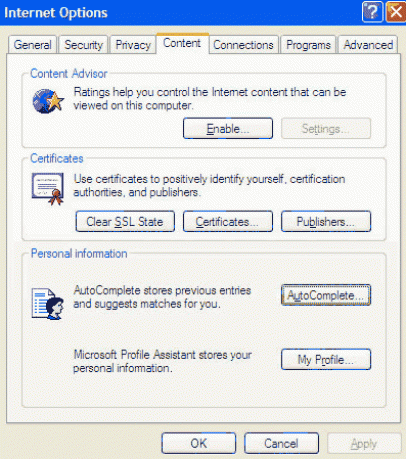
  2. Select Tools > Internet Options > Content.
  3. Under "Personal information", click AutoComplete.
    Internet content options 
  4. To ensure password saving is happening, check User names and passwords on forms.
     
You may have websites for which you wish to save the username and password, but you do not want Internet Explorer to prompt you on any future sites. In this case, in the AutoComplete Settings box, leave User names and passwords on forms checked, but uncheck Prompt me to save passwords.

Safari for Macintosh

To enable password saving in Safari on Macintosh:
  1. Open Safari.
  2. Go to Safari > Preferences.
  3. Click the Autofill icon and check User names and passwords.
     
  4. Click Done and close Preferences.

Firefox

To enable password saving in Firefox on Athena, Linux, Macintosh, and Windows

  1. Open Firefox.
  2. Go to Preferences > Options, as follows:
    • Athena and Linux: Edit > Preferences
    • Macintosh: Firefox > Preferences
    • Windows: Tools > Options
  3. Click the Security icon.
     
  4. Check Remember passwords for sites.
  5. To quit Preferences/Options:
    • On Athena and Linux, click Close.
    • On Macintosh, click the Close button.
    • On Windows, click OK.

Tuesday, February 25, 2014

Supp PN Trial Opens

Well done everyone working on the Supplemental Parenteral Nutrition in Critically Ill Patients (SuppPN). It's open for enrolments in 4 locations across AU and NZ.

Read more about it on the study website.

Tuesday, January 14, 2014

Planned Outage Wednesday 22nd January

We anticipate 2 outages of up to 10 minutes between 10pm and 1am on Wednesday night, the 22nd of January.
Spinnaker websites will be effected by these outages.

Friday, December 20, 2013

Take care, lets all have a happy Christmas

Have a Happy Christmas and take care over the summer ....  on the roads, at the beach and out boating.

Spiral are a business supporter of the Wellington Free Ambulance.  We want to say thank you for all they do and we are grateful they are there.


Friday, October 18, 2013

Are browser changes affecting your site?

Unfortunately when we build web software we can't always foresee the future. Web browsers such as Firefox, Chrome and Internet Explorer are periodically changed and updated by their manufacturers causing some sites built to work with older standards to have problems. This is simply a part of the ongoing evolution of the internet. Recently we were alerted to an issue that had arisen as a result of some of these changes.

The problem showed up when some of our clients were attempting to upload images. An error would appear in a pop up box as they went to the image upload page. It was a strange sort of an error as it was intermittent. Some quick research online revealed that was a known issue that had cropped up recently and was present across multiple browsers. It appeared to affecting anyone using our latest image upload component across both Firefox and Chrome (although it's very possible that other browsers are suffering from the same issue).

We have been aware in a general way of this issue since September 2013 although it's only recently that specific issues have come to our attention. While there hasn't yet been a fix released by the browser manufacturers we have managed to macgyver a workaround. Basically we defined a width for the uploader component that previously didn't need defining.

Its a bit crazy and quite possibly to a lot of people it doesn't mean any more than if we said that we summoned the elves of the internet to dance three times clockwise around a mushroom. But the internet is a weird and wonderful place. It's a land of constantly changing rules that are defined not by one overarching authority but by the interactions of thousands of interlocking contributors. Little tweaks upstream by various providers will have an effect on those of us working further down. We can do our best to keep up with every new wave but sometimes it is simply a case of making changes on the go as each new tweak catches up with us.

Friday, October 04, 2013

Change is in the wind

There's been some changes at Spiral that you might be interested in. Three months ago I set a new course for Spiral.  Reflecting on progress so far I can say this has been one of the best course changes ever. At times it's been hard, challenging and downright sad, yet I have always felt the wind was on my back and we were doing the right thing.

If you compare this course change to that which you might undertake if you decide you want a toned bod' and you may need to shed some weight, have regular workouts, and eat properly. Then with Spiral I saw we needed to do the same we:
  • shed some weight and left our Petone office 
  • stopped eating "junk food" or websites. Website's were a short-term cash-flow satisfiers and often left us with the feeling that we could have done better but there wasn't the time  
  • "beefed up" on our software development and are now at the top of the .NET game (well Cain is!)
There are 4 of us in the team and we are all working from home. Audrey Shearer and Alan Watson in Wellington, Cain Harland in Napier, Maureen Hines in England and the services of 3 outside contractors in Wellington when we need them.   A newly implemented virtual telephony system means that you can continue to call the same number to contact us 04 5862686. You'll find the new system lets you choose who to talk to … or call me (Audrey) on my mobile.

We've been very busy working on delivering projects including a major project to an Australian client. Another project from the Medical Research Institute of New Zealand, for another ICU clinical trial, is in full swing.  Medical trial software has become an important growth area for us and a significant portion of our revenue. 

Graphical website design is no longer part of our core business and we will work with graphic designers on larger projects. Our functional design skills have been extended and this feeds back into the software we are developing for businesses and organisations needing database-web integration.

We continue to look after our existing clients and will continue to provide agency type services through partnerships with other businesses and local contractors.

Tuesday, September 10, 2013

Reminders are here

After requests to include reminders for follow-ups in the Spinnaker we are pleased to announce they have been implemented in the Supp PN Nutrition Trial.
Reminders will now form part of the core Spinnaker software, which means everyone gets them when they use our software. We had to make some changes to the user profile settings so that people could opt in or opt out of receiving the reminders.

Heres how they work:
You can opt in to receive weekly reminders on your user profile page,
Once you opt in you will receive an email every Monday with patients listed who are
  1. due for follow-ups this week
  2. missing follow-up data in the software. You may have followed up but not entered into the software yet
  3. due for follow-up in 2 weeks
We hope you find this a useful addition.


Thursday, August 29, 2013

HEAT patient transfer successful

The first patient transfer within the HEAT trial was successful this week. 
All the clinical trials using our Spinnaker Software have the potential to transfer patients between locations. The software maintains the double blind nature of their treatment and allows the new location to continue with record keeping seamlessly.   

Here's what you do
The patient needs be transferred by the incoming ICU.

  1. The outgoing ICU informs the incoming ICU of the patients study ID and date of birth
  2. The RC at the new ICU will to log-in to the trial website
  3. select the "Overview" or "Dashboard" page
  4. click ‘Transfer a patient’
  5. enter the patient’s Study ID and date of birth
  6. select ‘Transfer Patient’, then ‘OK’.
The new location can ‘Resupply’ study drug for the patient from the website so there is no need to send study drug with the patient.

Wednesday, July 17, 2013

Add a video to your website

There are essentially 2 ways to add a video to your Spiral website
  1. Upload your video to a video service website like YouTube or Vimeo.
  2. Hosting on your website. Send us the video file and we will add it to your site. 

Using YouTube

With your video recorded and edited it's a simple process to upload it to YouTube, there is help on the YouTube website to explain how to do this. Once it's uploaded YouTube will provide you with a code snippet that you can include in your website and the video will look like it is part of your site. The beauty of this method is that YouTube takes care of the conversion to a suitable web format and enables it to be viewed on PC's and Mac's. Your website visitors can watch your video with no extra software and bandwidth is free for you.

Hosting on your website

To include a video on your website and have it hosted on our server you will need to send us the video as the file will be too big to upload through the asset manager. 

Until now there has not been a standard for showing video or movies on a web page. Most videos were shown through a plug-in (like Flash) but different browsers may have had different plug-ins. To watch the video you needed to have the plug-in or to download it to your computer. Using HTML5 we are now able to embed a video in a webpage. Currently there are 3 supported video formats for the HTML5 video element. They are MP4, WebM and Ogg. Older browsers dont support HTML5. This table shows current browser support for the 3 video formats.
The real issue is the HTML5 video element is not supported by Internet Explorer 8 or earlier. 

Remember in New Zealand all our hosting providers charge for overseas traffic. If your video is popular overseas and watched by many then you will rack-up overseas traffic and may be charged extra for it.

Summary

For us in New Zealand YouTube provides a quick, simple, professional and low-cost way to include video on our websites. This is our recommended method.


Saturday, July 13, 2013

Moving out, moving on

Today we moved the "big" stuff from our office to the lockup down the road. With plenty of boxes to fill we will be kept busy for another week with packing and actual work before we move completely on Friday.

Its been 5 crazy weeks that started with looking about for a smaller office in Petone (one of our favourite places). With only 2 or 3 of us in the office most days our 123 sq metres was silly. I told our lovely landlord we wouldn't be renewing our lease later in the year and on the same day, entirely unconnected, our neighbour came over looking for more office space. One thing led to another, they really wanted more space in July, we agreed they could move in on the 20th of July.

Yes, I looked around for office space once we had decided to move, but not too hard I admit because over the past few months I've been working at home a couple of days a week and loving it. Our team already has 2 Kiwi's working remotely, one in the Hawkes Bay and another in the UK. The switch from running a partial-cloud office to a full-cloud office didn't seem such a big step, after-all  the cloud is our natural environment.

We are using Dropbox, Highrise, Basecamp, Skype and will add a Voip phone system this week, hopefully customers will get the same or better service from us. We may find a little office to suit or we may continue to work from home. Over the next few months we'll let you know how we get on.

Wednesday, May 08, 2013

How to run a Facebook Ad campaign

Creating a Facebook ad campaign can be a great way to get your name out there, particularly if you combine it with something people want like a competition. It can be easier than you think to create a campaign and with the tools Facebook provides your ads can targeted to specific groups of people.

The first step on any campaign is to create your advertisement. On the top right of your Facebook page you'll find a "Create Advert" option under the settings button as is shown below.


You'll be taken to a page where you choose who you want to create the advert for; usually you'll be selecting a page for which you are an admin. If you are an admin on multiple pages then select the page you want to create the campaign for.

Facebook has some great tools for pointing you in the right direction when creating ads (they want your money after all so if anything they've made it easier to create ads than to use their sometimes knotty free features). Once you've arrived on the ad creation page there are helpful links all over the place to guide you through the process but I've included a few screenshots here to show some of the features.

Below is the section where you enter the content of your ad. You want a short, snappy headline; Some concise, informative text; and an eye catching picture. Make sure the picture is bi enough to fill up the space available or your ad will look undersized. You also have a choice of where your ad will direct people to. A common one is just to direct people to your page's Timeline but equally useful is to have the ad directing to a competition app that you've set up or had set up for you.


After the basics of what the ad will look like you can choose to target your campaign. The first and most useful tool is to target people by location, age and gender as is shown below. If you are a local business you can make sure you are only targeting locally and in your target demographic.


From there you can also target by specific interests or platforms that your potential customers might be using. This one is a great idea in theory, and it certainly explains to me why Facebook is always so keen to get me to fill out the "Interests" section of my page, but not everyone with those interests will have filled out that section. If you make your target particularly narrow you may miss some potential customers. Having said that there are a lot of people who have filled out the interests sections so if you target those areas you can be sure you'll be going after enthusiasts. This could be a great strategy if you're on a smaller budget and have a clearly defined target demographic.


The final part of setting up an ad is the pricing. It is incredibly simple to do. You just need to set a budget (either per day or for the whole campaign) and set how long you'd like to run the campaign for. It can be a little annoying as it didn't seem to let me select any non-USA time zones for my scheduling but it isn't all that difficult to subtract 19 hours to get California time. Once you've chosen your budget you enter your payment details and go from there. Any time you want to come back and make changes you can and you'll be provided with some great reports on your ongoing campaign.


The ad you've created will appear on the side of your target's Facebook feeds and should look similar to the ones below. A little something that appears on the right hand side of Facebook feeds. Facebook also gives you a "Sponsored Story" when you create an ad. This is just an item that pops up in the news feeds of people who fit your target criteria and are friends of people who have already 'liked' your page. This can be a particularly powerful tool as it acts as a sort of referral system directing new people to your Facebook page.


So that's Facebook ads. Fantastic little tools for promoting your message on what is an almost ubiquitous platform these days. Have a look and try them out for yourself. You won't be charged unless you enter payment details so you can have a play around for free quite easily. You might be surprised what you can do.